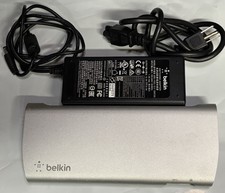
• Genuine Belkin Thunderbolt 2 Express Dock (Model F4U085)
• Used, fully tested and working
• Includes: Dock and Power adapter
• NOT included: Thunderbolt 2 cable
• Some normal signs of previous use, no effect on performance
• Great for expanding ports on Mac with Thunderbolt 2
⸻
🔌 Main Ports
• 2 × Thunderbolt 2 ports
• One typically connects to your computer, the other can daisy-chain additional Thunderbolt devices.
• Thunderbolt 2 max bandwidth: 20 Gb/s.
• 3 × USB 3.0 Type‑A ports
• Connect keyboard, mouse, external drives, or other USB devices.
• Speed: up to 5 Gb/s.
• 1 × HDMI output
• Connect to a monitor or TV.
• Supports high resolutions, including 4K Cinema mode (refresh rate may vary).
• 1 × Gigabit Ethernet (RJ‑45)
• Provides wired network connectivity for computers without an Ethernet port.
• Audio ports
• 3.5 mm headphone/audio output
• 3.5 mm audio input/mic
• AC/DC power input
• The dock requires external power to operate USB devices and HDMI.
⸻
🖥️ Features / Use Cases
• Single Thunderbolt connection to your computer expands multiple ports at once.
• Multiple device support – can connect up to 8 devices, including displays, USB peripherals, and Ethernet.
• Dual-display + 4K output – supports two monitors; for 4K, typically only one display can run at full 4K Cinema mode.
• Daisy-chaining – connect additional Thunderbolt devices through the second Thunderbolt port.
• Mac and Windows compatible – works with Thunderbolt-equipped Macs and PCs.
⸻
⚠️ Notes / Limitations
• One Thunderbolt port is mainly for the computer; the other is for daisy-chaining devices. More devices may slightly reduce bandwidth.
• Non-Thunderbolt monitors may require an adapter.
• The dock must be connected to its power adapter; USB and HDMI ports will not work without power.