When you click on links to various merchants on this site and make a purchase, this can result in this site earning a commission. Affiliate programs and affiliations include, but are not limited to, the eBay Partner Network. When you click on links to various merchants on this site and make a purchase, this can result in this site earning a commission. Affiliate programs and affiliations include, but are not limited to, the eBay Partner Network.
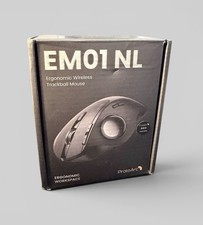
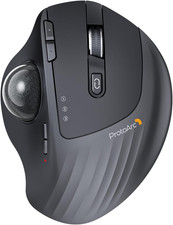
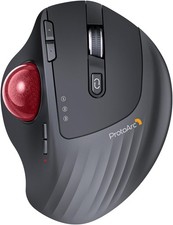
ProtoArc EM01 NL Wireless Trackball Mouse, Rechargeable Thumb Control, Gray0/20° Adjustable Angle to Reduce Fatigue, Triple-Device Bluetooth & 2.4G USB-A for Office Use, Silent Click, Easy to Clean FREE SHIPPING!Opened and tested to verify that it connects and works. Connected via bluetooth and operated as expected. Appears new.Part of a larger lot of items I purchased as a bulk lot. Many of the items were big box or online returns from a major online site. The box, charging cable, and paperwork is included. Otherwise untested and sold as-is, no warranty or returns. See all details and photos, and feel free to ask any questions prior to purchase. Priced accordingly. The ProtoArc EM01 NL Ergonomic Wireless Trackball Mouse in Black is a versatile and modern mouse designed for multiple devices. With a maximum DPI of 1600 and ergonomic design, this mouse provides precise and comfortable control for extended use. The wireless connectivity options, including Bluetooth, ensure flexibility in how you use the mouse. Made by ProtoArc in China, this trackball mouse is a high-quality and stylish addition to any workstation. About this item - Adjustable Trackball Comfort: The 0-20° hinge lets you set the trackball angle to match your hand position, supporting a more natural grip through long work sessions
- Thumb-Control Precision: Navigate documents and web pages by moving the thumb trackball instead of your whole arm, making it easier to work on crowded desks, couches, or beds
- 3-Device Wireless Control: Bluetooth and 2.4G wireless modes let you connect up to three devices and switch between PC, laptop, and tablet with one button
- Rechargeable 5-DPI Tracking: The built-in rechargeable battery avoids disposable battery swaps, while 200/400/800/1200/1600 DPI levels adjust cursor speed for different tasks
- Quiet Shared-Space Clicks: Quiet left and right clicks and a frosted surface support focused work in offices or home spaces; scroll wheel and side buttons are not silent
- Easy Trackball Maintenance: Every trackball collects dust—it's normal. Clean the ball and 3 white rollers after long use. Otherwise, accuracy and smoothness drop, especially at startup or heavy app loading
- Health Tip: Like any ergonomic tool, trackball mice require a short learning curve. Unlike traditional mice, they keep your wrist stable – a more natural motion that reduces pressure and fatigue. Most users adapt within 1–2 weeks. Experiment with hand positions to find your comfort. Our goal: healthier, pain‑free use for years
 |
|