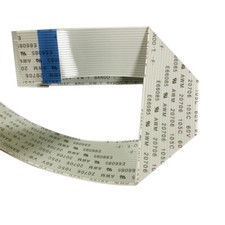
1PC New Original Mimaki E301338 Printhead Data Cable for UJF-6042MkII/UJF-3042MkII 🛠️ PRINTHD DATA CABLE | E301338 | 100% ORIGINAL | 1PC PACK
Product Name : Printhead Data Cable
Original Part No. : E301338
Spec : 1PC New & Original Mimaki Genuine Accessory
Core Function : High-precision data transmission between mainboard and printhead
Applicable Models : Mimaki UJF-6042MkII / UJF-3042MkII
1PC New Original Mimaki E301338 Printhead Data Cable
This is a 100% new original Mimaki genuine printhead data cable with exclusive part number E301338, specially designed for Mimaki UJF-6042MkII and UJF-3042MkII printers. As the core data link between the printer mainboard and printhead, it adopts high-purity oxygen-free copper core and high-shielding anti-interference structure, which ensures stable, delay-free and undistorted data transmission, effectively resisting electromagnetic interference in the working environment and avoiding printing faults such as missing lines, color deviation and blurred images. With original standard snap-in interface, it realizes plug-and-play installation, no welding or secondary debugging required. Made of high-flexibility and wear-resistant PVC outer sheath, it is anti-bending and anti-aging, adapting to the frequent movement of the printhead during long-term operation. It is the ideal original replacement part for the maintenance of Mimaki UJF series printer data transmission system.
📋 Product Specifications
Material : Mimaki Original Oxygen-free Copper Core + High-shielding Foil + Wear-resistant PVC Sheath
Part Number : E301338
Packing : 1 PC / Pack
Type : Printer Printhead High-precision Data Transmission Cable
Interface : Original Standard Snap-in Interface (Plug-and-play)
Applicable : Mimaki UJF-6042MkII / UJF-3042MkII Printers
🔌 Exclusive Compatible Models
- UJF-6042MkII
- UJF-3042MkII
📦 Package Contents
✔ 1 x New Original Mimaki Printhead Data Cable (E301338)
🔧 Installation Guide & Warnings
⚠️ Power off the printer and unplug the power cord before installation! Wear anti-static gloves and avoid bare hand contact with the connector!
- Open the printer protective cover to expose the printhead and mainboard data cable interface.
- Press the lock buckle of the old cable connector, pull out the old cable gently (do not hard pull to avoid interface damage).
- Align the new E301338 cable connector with the interface accurately, insert it firmly until the lock buckle clicks into place.
- Check both ends of the cable are plugged in tightly, arrange the cable to avoid being pressed by other components.
- Close the protective cover, plug in the power cord and turn on the printer, perform a print self-test to verify normal operation.
Tip: Clean the interface with a dry anti-static cloth before installation; avoid right-angle bending of the cable.
🏢 Purchase Information
- Retail : 1 PC available for purchase, fast delivery for single machine maintenance.
- Bulk : Volume discounts for orders over 20PCS, support long-term stable supply.
- Packaging : Anti-static & anti-pressure packaging to protect the cable and connector.
- Shipping : Global fast shipping with professional industrial packaging.
- Combination : Extra discount when purchased with other Mimaki UJF series accessories.