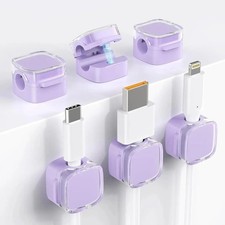
🔥6 PCS Magnetic Cable Clip Cable Holder for Home Office Under Desk Management, Wire Organizer, Cord Holder, Adhesive Cable Clips for Computer, USB and Charging Cables🔥📝 Introduction
✨ Keep your workspace neat, organized, and clutter-free with the 6-Piece Magnetic Cable Clip Organizer Set! Designed for modern homes, offices, gaming stations, and workspaces, these practical cable holders help keep charging cables, USB cords, computer wires, and other compatible cables securely in place and within easy reach.
🔌 Featuring an innovative magnetic opening-and-closing mechanism, these cable clips allow you to insert and remove cables conveniently with just one hand. The 7.5 mm (0.30-inch) cable slot accommodates many commonly used cables, while the adhesive mounting system makes installation simple without drilling, screws, or complicated tools.
🏡 Whether you are organizing a home office, tidying up your bedside charging station, improving your gaming setup, or managing cables beneath your desk, this versatile 6-piece set offers a practical solution for everyday cable management.
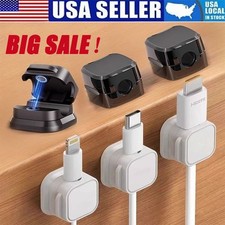
🎨 Available in White and Black, these compact cable organizers complement a variety of interiors while helping create a cleaner, more professional-looking environment.
⭐ Key Features🧲 1. Innovative Magnetic Opening-and-Closing Design
Experience convenient cable management with a thoughtfully designed magnetic clamp mechanism.
🧲 Magnetic closure: Helps keep compatible cables in position while allowing convenient access.
☝️ One-handed operation: Insert or remove a cable without needing to operate a complicated fastening system.
🔄 Approximately 60° rotating shaft: The supplied product description identifies a rotating mechanism designed to make cable insertion and removal easier.
🔌 Quick cable access: Retrieve the cable you need and return it to its holder after use.
🏠 Everyday convenience: Particularly useful for frequently accessed charging cables and workstation connections.
Enjoy a more practical setup without repeatedly searching behind furniture or picking cables up from the floor.
📏 2. 7.5 mm (0.30-inch) Cable Slot
The cable slot measures approximately 7.5 mm (0.30 inches) in diameter, making it suitable for many commonly used cables, depending on their actual thickness and shape.
Compatible cable types may include:
📱 Smartphone charging cables
🔋 USB charging cords
💻 Computer power cables that fit the opening
🎮 Gaming accessory cables
🖥️ Peripheral cables
📺 Compatible HDMI cables
🎧 Headphone and accessory cords
⌚ Charging cables for compatible electronic devices
Important: Cable compatibility depends on the cable's outer diameter, connector shape, and flexibility. Thick, rigid, unusually shaped, or oversized cables may not fit. Measure your cable before purchasing if compatibility is essential.
🧼 3. Enhanced Acrylic Adhesive Mounting System
Enjoy a straightforward installation process with the adhesive mounting pad.
🪄 Tool-free installation: No drilling or screws are required for normal adhesive mounting.
🧹 Clean-surface application: Designed for clean, dry, smooth, and flat surfaces.
🪵 Versatile placement: Potentially suitable for compatible finished wooden surfaces, desks, glass, ceramic tiles, and other smooth materials.
🛡️ Removable adhesive design: The transparent acrylic adhesive pad is intended to support removal with minimal residue under suitable conditions.
♻️ Replacement adhesive pad: The product description states that a replacement adhesive pad is included to support reuse.
Adhesion depends on surface material, texture, cleanliness, temperature, humidity, and installation technique. Delicate paint, wallpaper, unfinished wood, and textured surfaces may not be suitable.
🗂️ 4. Keep Cables Organized and Accessible
Create a tidier environment by positioning cables where you need them.
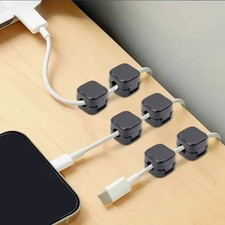
🔌 Keep charging cords near your desk or bedside table.
🖥️ Organize frequently used workstation cables.
🏡 Reduce loose cables hanging behind furniture.
🎮 Improve the appearance of gaming desks and entertainment areas.
📚 Keep cable routes arranged along convenient edges and corners.
🧹 Help prevent compatible cables from resting on the floor.
The six individual holders allow you to create a customized cable-management arrangement based on your workspace and daily routine.
📐 5. Compact, Space-Saving Construction
Each holder is designed to occupy a relatively small mounting area.
📏 Approximate holder width: 0.87 inches (22.1 mm).
🪑 Suitable for many narrow desktop edges and compact workspaces, subject to available mounting space.
🏢 Useful for home offices, shared workstations, study desks, and professional environments.
🎯 Helps keep cable holders discreet when installed in suitable corners or along desk edges.
The compact design makes it easier to incorporate cable management into existing furniture arrangements without introducing bulky accessories.
🎨 6. Two Classic Color Options
Choose a color that complements your furniture and accessories.
⚪ White: A clean, understated appearance that pairs well with light-colored desks, minimalist interiors, and white electronics.
⚫ Black: A subtle, coordinated look for darker desks, gaming stations, office furniture, and black electronic accessories.
The available color depends on the selected product variant.
📋 TypeMagnetic Cable Clip / Adhesive Cable HolderBrandJoyroom, as identified in the supplied product descriptionPackage Quantity6 cable clipsAvailable ColorsWhite / BlackMain MaterialPlasticPlastic TypePC plastic, according to the supplied specificationsClosure MechanismMagnetic opening-and-closing designRotating MechanismApproximately 60°Cable Slot Diameter7.5 mm / 0.30 inApproximate Holder Width22.1 mm / 0.87 inMounting MethodAdhesive mounting padAdhesive TypeAcrylic adhesive, as described by the supplierInstallationTool-free on suitable surfacesIntended UseCable organization and managementSuitable LocationsDesks, tables, selected walls, and other compatible smooth surfacesReusabilityReplacement adhesive pad is stated to be includedEnvironmental FeatureDescribed by the supplier as eco-friendly plasticProduct WeightNot specified in the supplied informationOverall DimensionsFull dimensions not specified; width is approximately 22.1 mm / 0.87 inCable Length CapacityNot applicable; accommodates individual compatible cablesPower RequirementsNoneBatteries RequiredNoAssembly RequiredNo conventional assembly; adhesive installation is required
📌 Measurement note: The stated 7.5 mm / 0.30-inch slot diameter and 22.1 mm / 0.87-inch holder width are based on the supplied product description. Other dimensions and the product's weight have not been provided and should not be assumed.
📦 Package Includes
The advertised set contains:
🏠 Where and How to Use This Product🖥️ 1. Home Office and Professional Workspace
Create a more organized workstation by keeping frequently used cables close at hand.
Suggested applications:
USB charging cables beside your monitor.
Compatible peripheral cables near your keyboard or mouse area.
Charging leads along the edge of a desk.
Cable routing near a docking station.
Frequently accessed accessory cords.
💡 Organization tip: Place each clip near the point where you normally pick up or disconnect a cable. This reduces the need to reach behind the desk.
📚 2. Study Desk and Student Workspace
Maintain a tidy study area for computers, tablets, phones, and compatible accessories.
📱 Keep a phone charging cable near your preferred charging spot.
💻 Position a compatible cable near your laptop workspace.
✏️ Reduce loose cords around books, notebooks, and study materials.
🎯 Arrange multiple cables in a consistent line along the desk edge.
🛏️ 3. Bedroom and Bedside Table
Make nighttime charging more convenient by keeping compatible charging cables within reach.
🔋 Position a clip beside your bedside charging area.
📱 Keep the cable end from slipping behind a nightstand.
🕯️ Maintain a cleaner appearance around lamps and other bedside accessories.
⚠️ Keep adhesive-mounted clips and cables away from hot surfaces, liquids, and locations where cords could become trapped under furniture.
🎮 4. Gaming Setup
Organize compatible cables around a gaming desk to support a cleaner setup.
🎮 Manage controller charging cables.
🎧 Keep compatible headset charging leads accessible.
🖥️ Arrange selected accessory cables around the workstation.
🧩 Separate frequently used cords to make individual cables easier to identify.
The clips organize cables but do not replace electrical cable protection, surge protection, or proper equipment ventilation.
📺 5. Television and Entertainment Areas
Use compatible clips to help manage frequently accessed cables around entertainment furniture.
🔌 Keep selected accessory cables near a media console.
🎮 Organize charging leads for gaming accessories.
📡 Guide suitable low-voltage cables along convenient furniture edges.
⚠️ Do not obstruct ventilation openings or place cables where they can be crushed, overheated, or pulled accidentally.
🚗 6. Vehicle Interior
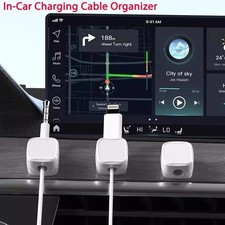
The supplier describes the clips as potentially suitable for locations such as a car dashboard. Actual suitability depends on the adhesive, surface material, heat exposure, and vehicle conditions.
Potential applications include organizing compatible charging cables in a suitable interior location.
🚘 Important: High cabin temperatures, direct sunlight, textured dashboards, and surface coatings can reduce adhesion or cause damage during removal. Test a discreet area first, and never mount a cable holder where it interferes with airbags, controls, visibility, or safe vehicle operation.
🪑 7. Under-Desk Cable Management
Create a more orderly desk area by positioning compatible cables along suitable underside edges or nearby furniture surfaces.
🧹 Help prevent loose cables from falling onto the floor.
🔌 Keep selected cords close to their connection points.
📐 Arrange cables along planned routes.
🖥️ Support a cleaner appearance around desktop computers and accessories.
📌 Adhesive performance beneath a desk depends on surface preparation and the weight and tension applied to the cable. Avoid using these clips as load-bearing supports for heavy power cords or cable bundles.
🧵 8. Creative Workspaces and Craft Tables
Organize compatible charging and accessory cables around sewing tables, hobby desks, and creative workstations.
🎨 Keep frequently used accessory cords in convenient locations.
✂️ Reduce loose cables across active work areas.
📦 Create a consistent cable arrangement across multiple stations.
Always keep cords away from cutting tools, moving equipment, and hot crafting tools.
🎁 Key Benefits and Advantages✨ A Cleaner, More Professional Appearance
Loose cables can make even a well-organized workspace look cluttered. These compact holders help establish a more deliberate arrangement by keeping selected cables in designated positions.
⏱️ Convenient Everyday Access
The magnetic opening-and-closing design is intended to make inserting and retrieving compatible cables easier, especially when a cable is used frequently throughout the day.
🧲 Practical Cable Retention
The clip helps keep a cable end in its intended location, reducing the likelihood of repeatedly searching behind desks, tables, or furniture.
🏡 Flexible Placement
The adhesive mounting system allows placement on suitable surfaces without drilling holes. This is particularly convenient for rented spaces, finished furniture, and workstations where permanent modifications are undesirable.
📏 Efficient Use of Space
The approximate 22.1 mm / 0.87-inch holder width helps the clips fit into many compact mounting areas.
🎨 Coordinated Interior Styling
White and black options make it easier to coordinate the holders with desks, accessories, and electronics.
♻️ Potential Reuse
The supplied description identifies a replacement adhesive pad, allowing the holder to be remounted when the original adhesive is no longer suitable, provided the clip itself remains in good condition.
💼 Flexible Six-Piece Set
Six clips offer flexibility for organizing cables across several locations or creating a dedicated arrangement at a single workstation.
🛠️ Installation Guide: Step by Step
Follow these steps to improve adhesive performance and help keep the clips securely positioned.
Step 1: Choose a suitable surface 🪵
Select a clean, dry, smooth, and flat area that is compatible with acrylic adhesive.
Step 2: Clean the mounting area 🧼
Remove dust, grease, moisture, and other contaminants. Allow the surface to dry completely before installation.
Step 3: Position the holder 📐
Check the cable route and ensure the selected position allows easy access without interfering with other equipment.
Step 4: Remove the protective backing ✨
Carefully remove the protective layer from the adhesive pad without touching the adhesive surface unnecessarily.
Step 5: Press firmly for 30 seconds ✋
Position the holder and maintain firm, even pressure for approximately 30 seconds, as recommended in the supplied installation instructions.
Step 6: Allow the adhesive to settle ⏳
Wait 12–24 hours before regular use, as recommended by the supplier. This allows the adhesive to develop a more reliable bond.
Step 7: Insert the cable 🔌
Open the magnetic clip, position a compatible cable in the slot, and allow the closure mechanism to secure it.
Step 8: Test carefully ✅
Gently check that the clip is attached securely and that the cable can be removed smoothly without excessive force.
💡 Professional tip: Do not stretch, pull, or place unnecessary tension on the cable while the adhesive is settling.
⚠️ Important Precautions and Care Instructions🧽 Surface Preparation
Use a clean, dry, smooth, and flat mounting surface.
Avoid dusty, oily, damp, or heavily textured areas.
Test the adhesive on a discreet area if the surface has a delicate finish.
Follow the surface manufacturer's cleaning recommendations.
🧲 Cable Compatibility
Confirm that the cable fits within the 7.5 mm / 0.30-inch slot.
Avoid forcing oversized cables into the clip.
Do not bend cables sharply to make them fit.
Check that the magnetic mechanism closes properly around the cable.
🛡️ Adhesive Limitations
Adhesion may weaken with humidity, heat, dust, vibration, or repeated pulling.
Do not assume that every painted wall, wallpaper surface, or unfinished wooden surface is suitable.
Removal may still affect delicate finishes, despite the supplier's low-residue adhesive claim.
Do not hang heavy objects or support heavy cable bundles with these clips.
🔌 Electrical Safety
These clips are cable organizers, not electrical insulation or protective electrical equipment.
Do not use them to repair damaged cables.
Do not place them over damaged insulation, exposed conductors, or electrical connections.
Keep cables away from water, flames, hot equipment, and sharp edges.
Ensure that power cords are not pinched, excessively bent, or placed under tension.
🚗 Vehicle Safety
Avoid locations exposed to excessive heat or direct sunlight when adhesive suitability is uncertain.
Never obstruct airbags, dashboard controls, pedals, or the driver's field of vision.
Check adhesion regularly in environments subject to vibration or temperature changes.
🧼 Cleaning and Maintenance
Wipe the plastic holder gently with a soft, dry or slightly damp cloth.
Avoid abrasive cleaners and harsh solvents.
Inspect the adhesive and magnetic closure periodically.
Replace or reposition a clip if it becomes loose or damaged.
🛍️ Why Buy This Magnetic Cable Clip Set?
🌟 Choose a more organized approach to everyday cable management.
This six-piece set combines a compact design, magnetic access, adhesive installation, and versatile placement options in one practical accessory.
🔌 Convenient cable access: Keep frequently used compatible cables close at hand.
🧲 Magnetic closure: Enjoy a straightforward way to insert and remove cables.
📏 Compact profile: Organize cables without occupying a large mounting area.
🛠️ Simple installation: Attach the holders to suitable surfaces without conventional drilling.
🏡 Versatile applications: Organize selected cables at desks, bedside tables, gaming stations, and other appropriate locations.
🎨 Classic color choices: Select white or black to complement your setup.
📦 Six-piece value: Arrange several cables in one workspace or distribute the clips between different locations.
✨ Whether you are refreshing a home office, improving a gaming setup, or creating a tidier charging station, these magnetic cable clips offer a practical way to make everyday cable access more convenient.
🔑 Key Bullet Points
🧲 Magnetic Opening and Closing: Convenient access to compatible cables.
📏 7.5 mm / 0.30-Inch Slot: Designed for many commonly used charging and accessory cables.
📐 Compact 22.1 mm / 0.87-Inch Width: Suitable for many space-conscious mounting locations.
🧼 Acrylic Adhesive Mounting: Tool-free installation on suitable surfaces.
🪵 Versatile Placement: Potentially suitable for compatible desks, tables, glass, and ceramic surfaces.
🔌 Cable Organization: Helps keep selected cables in designated, accessible positions.
♻️ Replacement Adhesive: A replacement pad is stated to be included.
🎨 Two Color Options: White and black.
📦 Six-Piece Set: Flexible organization for multiple cables and locations.
🏠 Multiple Applications: Home, office, study, gaming, and other suitable indoor workspaces.
🛠️ Straightforward Installation: Clean, press for 30 seconds, and allow 12–24 hours before regular use.
⚠️ Compatibility Reminder: Check cable diameter, mounting surface, and environmental conditions before installation.
📌 Important Product Information
Please review the following details before ordering:
Color selection: Choose the desired available variant, white or black.
Package quantity: Six magnetic cable clips.
Cable slot: Approximately 7.5 mm / 0.30 inches in diameter.
Holder width: Approximately 22.1 mm / 0.87 inches.
Mounting: Adhesive-based; surface preparation is essential.
Adhesive performance: Depends on the mounting surface and environmental conditions.
Weight and complete dimensions: Not specified in the supplied product information.
Package contents: A replacement adhesive pad is stated to be included; the exact number is not specified.
Brand identification: Joyroom is named in the supplied product description. Buyers should verify the branding on the actual item and packaging if brand authenticity is important.
✨ Final Product Overview
Transform loose, inconvenient cables into a more organized and accessible arrangement with this 6-Piece Magnetic Cable Clip Organizer Set. Featuring a 7.5 mm (0.30-inch) cable slot, a magnetic opening-and-closing mechanism, compact construction, and adhesive mounting, these holders are designed to support practical everyday cable management.
🏡 Ideal for compatible home and office setups, they help keep frequently used cables in convenient positions while maintaining a clean, uncluttered appearance.
🔌 Organize your cables. Simplify your workspace. Enjoy convenient access every day. ✨




![6Pcs 3D Magnetic Ball Marker 6mm 3D Scanning Markers 3D Tracking Dots] picture](/store/item/img/g/X~IAAeSwvK1qspBx/s-l225/6Pcs-3D-Magnetic-Ball-Marker-6mm-3D-Scanning-Marke.jpg)