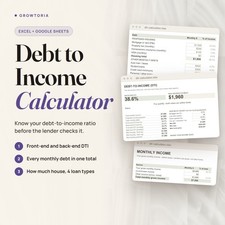
Debt to Income Calculator - See How Much House Your Income Supports
For buyers pre-qualifying or refinancing: find your front-end and back-end DTI and the max home price your income supports.
⚡ Instant digital delivery📊 Excel + Google Sheets🧮 Formulas built in🖨️ PDF version included
The Debt to Income Calculator is an editable mortgage qualification spreadsheet for Microsoft Excel and Google Sheets. It calculates your front-end and back-end debt-to-income ratios, shows a qualify or over-the-limit status against limits you set, and turns them into a max housing payment, max loan and max home price, with a table by loan type. You receive 1 Excel workbook (.xlsx) and 1 PDF version.
What you can do📐Front and back-end DTIHousing payment over gross income, and all monthly debt over gross income - the ratio lenders weigh most.🚦Qualify statusA clear qualify or over-the-limit status against the front-end and back-end limits you set.🏠Max home priceThe max housing payment, max loan and max home price your income supports.📊Max housing by loan typeA table shows max housing by loan type, because conventional and more flexible loans allow different DTI limits.How it works
- Open the file Open the .xlsx workbook in Microsoft Excel or upload it to Google Sheets.
- Enter income and debts Add your gross monthly income, any co-borrower or other income, your proposed housing payment and every monthly debt.
- Read the dashboard See your DTI ratios, your qualify status and the max home price by loan type.
What's included
- ✔️ 1 Excel workbook (.xlsx) with Dashboard, Income, Debts and How to Use sections - opens in Excel or Google Sheets
- ✔️ 1 printable PDF version with how-to-use pages
Why customers choose it🔍See it before a lender doesCheck your ratios ahead of a pre-qualification or refinance conversation.🎯A number you can act onInstead of a simple yes or no, you get the most house your income allows, by loan type.📈Know how to improveThe How to Use section covers the 28/36 rule, the limits for different loan types and how to improve your DTI.Buy with confidence
Instant electronic delivery • One-time purchase • Friendly support — just message us on .Quick answersWhat software do I need?
Microsoft Excel or Google Sheets to edit the spreadsheet; any free PDF reader opens the PDF version.How is it delivered?
Delivered electronically right after purchase through messages - nothing is shipped.What debts should I include?
Your proposed housing payment plus every monthly debt - car, student loans, the minimum payment on credit cards and support payments.Can I change the DTI limits?
Yes. The qualify status is checked against front-end and back-end limits you set, so you can match the loan type you are considering.Is this financial advice?
No. It is a planning tool, not legal, tax or financial advice, and it is not a loan approval - your lender makes the final decision.More from our storeBuying a home? Pair it with our Closing Cost Calculator and Rent vs Buy Calculator.Instant digital delivery after purchase - see your ratios before a lender does.License & buyer notice
This is an electronically delivered product — nothing is shipped. The buyer is only receiving a revocable license with specific limitations: one user, for personal or internal business use; the files may not be resold, shared or redistributed. Electronically delivered goods do not qualify for the Money Back Guarantee. What you need: Microsoft Excel or Google Sheets; a free PDF reader for the PDF version. If anything is not right, message us on and we will fix it.