Professional RAW Photo Editing Software -- Windows Professional RAW Photo Editing for Windows.
No Monthly Fees. No Subscription. No Adobe Required.
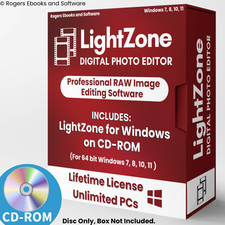
LightZone v4.2.4 -- Full Version on CD-ROM -- Windows 7, 8, 10 & 11 (64-bit)
✓ No Subscription ✓ Full RAW Processing ✓ Non-Destructive Editing ✓ Safe Offline Install ✓ 30-Day Returns
LightZone is a professional RAW photo editor built around the same zone-based tonal control system used by photographers for decades -- giving you precise, natural-looking results without the learning curve of complex layer-based editors. No subscription, no activation, no expiration. Install from disc and own it permanently.
What You Can Do:Edit RAW Camera Files
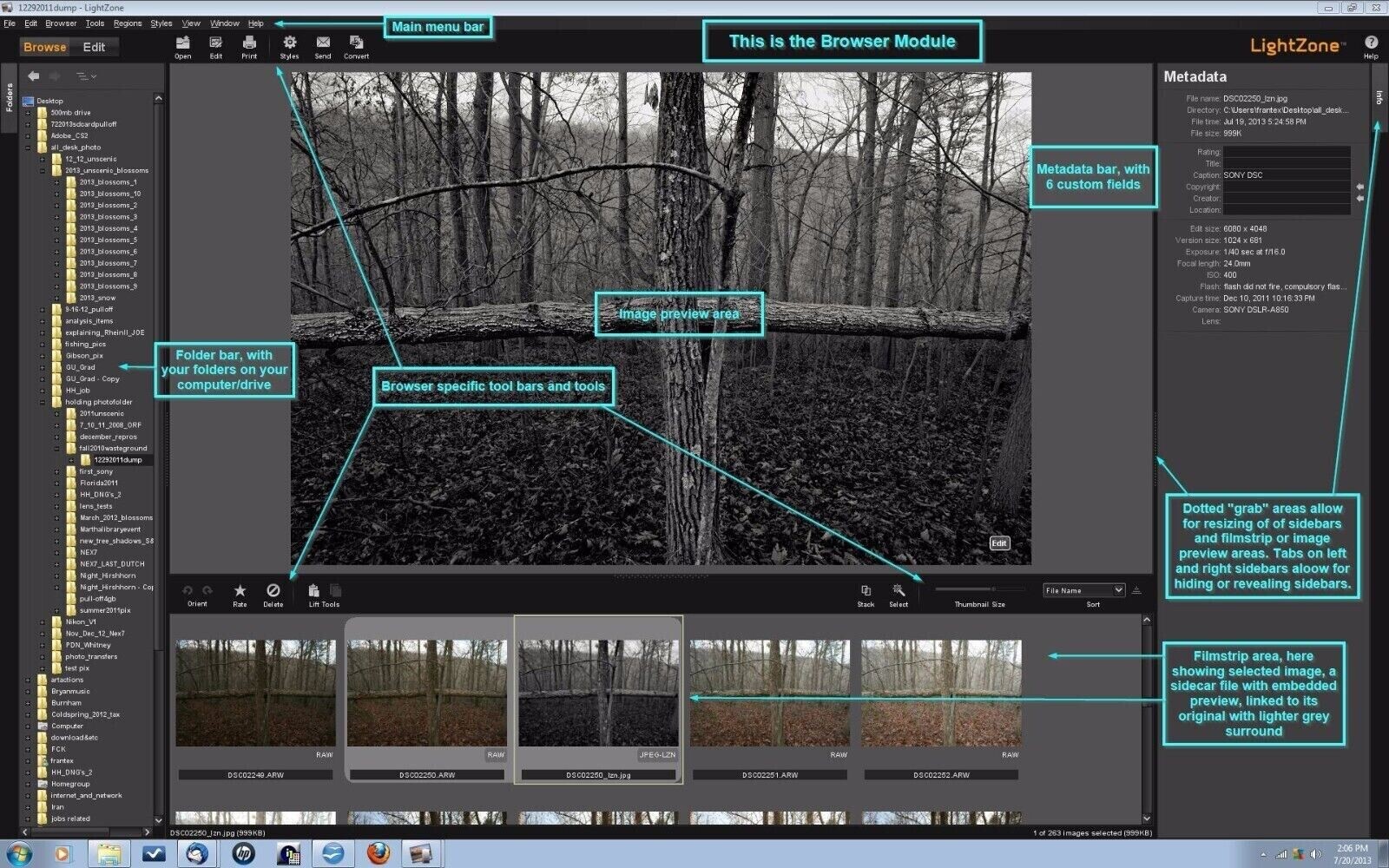
Open and process RAW files directly from your camera with full control over exposure, highlights, shadows, color, and detail -- without permanently altering your original files.Control Tones With Precision
LightZone’s zone-based editing system lets you target and adjust specific tonal ranges in your image -- darks, midtones, and highlights -- with the kind of control that takes hours to achieve in other software.Edit Non-Destructively
Every adjustment is applied in a re-editable stack of tools. Change or remove any edit at any time without starting over -- your original image is always preserved.Process Multiple Photos Faster
Apply styles and presets across batches of images to speed up your workflow. Perfect for photographers processing large sets of shots from a single session.Key Features:
- Full RAW File Support -- Opens RAW files from Canon, Nikon, Sony, and most major camera brands
- Zone-Based Tonal Control -- Inspired by the Ansel Adams zone system for natural, precise tonal adjustments
- Non-Destructive Editing Stack -- All edits are layered and re-editable at any time
- Sharpening & Noise Reduction -- Professional-grade detail and clarity tools
- Color Correction & White Balance -- Achieve accurate, vibrant color with full manual control
- Styles & Presets -- Save and apply your own looks across multiple images
- Batch Processing -- Apply edits to multiple images simultaneously
- Crop, Resize & Straighten -- Full image geometry tools built in
- Built-In Help System -- Comprehensive in-program documentation covering all tools and workflows
Learning Resources Included:
Your installation guide includes directions to the following official training resources:
- Built-In Help System -- The most comprehensive resource for LightZone, covering every tool, panel, and workflow in detail. Accessible directly inside the program after installation.
- Official LightZone YouTube Channel -- Video tutorials from the LightZone team. Great for visual learners who prefer watching a technique over reading about it.
- Zone System Training Article -- A detailed guide to understanding and using the Ansel Adams Zone System -- the foundation of LightZone’s editing approach. Helpful for both beginners and experienced photographers.
What You Will Receive:
- 1 x CD-ROM with LightZone v4.2.4 full installer for Windows
- Step-by-step PDF installation guide with screenshots (on disc)
- Directions to official LightZone training resources including the built-in help system, official YouTube channel, and Zone System training article (in install guide)
⚠ PLEASE NOTE: The software box shown in the listing photos is a product display image only. It is NOT included with your purchase. You will receive the disc only.
System Requirements:
- Operating System: Windows 7, 8, 10, or 11 (64-bit only)
- Processor: 1 GHz or faster
- Memory: 2 GB RAM minimum (4 GB or more recommended)
- Storage: 1 GB free disk space
- Drive: CD-ROM drive required for installation
Note: The product image is for representation only. This product comes in Bulk/Wholesale Packaging. Your item will be shipped in a 6x9 inch bubble mailer without a physical retail box. Installation instructions are included as a PDF in the main directory of the disc. The file name begins with “Read Me First”.
Hassle-Free 30-Day Returns or Exchanges
We want you to shop with confidence. If you ordered the wrong item, aren’t completely satisfied, or simply changed your mind -- no problem.
We offer a 30-day return or exchange policy, completely hassle-free. Just submit a return request through ’s return system, and we’ll approve it promptly.
Why Doesn’t This Come in a Retail Box?
This item is brand new and professionally packaged in bulk/wholesale packaging rather than a traditional retail box. Many high-quality software products are distributed this way to reduce waste, lower shipping costs, and offer better value.
What Is Bulk/Wholesale Packaging?
This is our most popular packaging type. Items are distributed in bulk to reduce costs and pass savings on to you. CDs are shipped in paper sleeves. This item does not come sealed or shrink-wrapped.
Frequently Asked Questions (FAQ)💻 Can I install this on multiple computers?
Yes. There are no limits -- install it on as many compatible computers as you like.🔑 Does this require a product key or activation?
No. This software does not require a product key, activation, or registration of any kind.📷 What RAW file formats does LightZone support?
LightZone supports RAW files from most major camera manufacturers including Canon, Nikon, Sony, Fujifilm, Olympus, Pentax, and more. It also supports JPEG and TIFF formats.📷 How is LightZone different from other photo editors?
LightZone’s zone-based editing system is its key differentiator. Rather than working with layers and masks like Photoshop or GIMP, LightZone uses tonal zones to control exposure and contrast in a more intuitive, photographer-friendly way. It is particularly well-suited for RAW processing and tonal work.📚 Do you include a printed manual?
Printed manuals are not included. LightZone includes a comprehensive built-in help system accessible directly inside the program. The installation guide also includes directions to the official LightZone YouTube channel and a Zone System training article.📦 Does it come in a box?
No. The box shown in the images is for illustration only. You will receive the disc in a protective sleeve inside a bubble mailer.🔁 Do I need to pay for updates?
No. Software updates are available at no charge when released.🔨 What is LightZone best used for?
– Processing RAW files from digital cameras
– Tonal and exposure control using a natural zone-based system
– Non-destructive photo editing without subscription fees
– A professional Lightroom alternative for photographers who want full control without monthly charges✅ Is this software legal?
Yes. LightZone is 100% legal open-source software licensed under the BSD License. It is fully authorized for distribution and use.Still have questions?
Feel free to message us -- we’re happy to help.Description of Our Services
All software and digital materials offered in our listings are sourced exclusively from open-source or public-domain repositories that are freely available online.
The price you pay does not reflect the cost of the software itself, which is available at no charge. Instead, it covers the labor involved in sourcing, organizing, testing, and preparing the files; creating instructional materials; transferring content to physical media; packaging; shipping; and associated marketplace fees.
We have been a trusted seller since April 2003 -- over 22 years of delivering quality products and reliable service. We take pride in delivering a convenient, ready-to-use product that saves you time and provides long-term value.
LICENSE AND DISCLAIMER INFORMATION
Rogers Ebooks and Software is the creator of this software package and its UPC code. All software included is open source. Rogers Ebooks and Software is authorized to distribute this software under the BSD License.
THE SOFTWARE IS PROVIDED “AS IS”, WITHOUT WARRANTY OF ANY KIND, EXPRESS OR IMPLIED, INCLUDING BUT NOT LIMITED TO THE WARRANTIES OF MERCHANTABILITY, FITNESS FOR A PARTICULAR PURPOSE AND NONINFRINGEMENT. IN NO EVENT SHALL THE AUTHORS OR COPYRIGHT HOLDERS BE LIABLE FOR ANY CLAIM, DAMAGES OR OTHER LIABILITY.